When a garage door won’t open, look up before you press anything again. A loud bang, a gap in a spring above the door, a loose cable or a crooked door points to a broken spring, a cable problem or a door off its track. Stop there: that is technician work. If none of those signs is there, check in this order: power to the opener, the wall button against the remote, the lock feature on the wall control, a manual lock on the door, the opener’s lights or code, and whether the opener is still connected to the door. The last check is pulling the emergency release, and only with the door closed. Each step below names the federal rule or the maker’s document it comes from. This page is part of our troubleshooting guide.
General information, not professional advice. Your door’s maker, your opener manual and a trained door technician decide what’s safe for your door, and local codes decide what needs a permit.
Stop first if you see any of these
- You heard a loud bang from the garage, and the door won’t open since.
- A spring above the door has a gap in its coils, or a spring along the side tracks hangs loose.
- A cable hangs loose, is frayed, or has come off its drum at the top corner of the door.
- The door sits crooked, a roller has left its track, or a panel is bent.
- The door is stuck partly open.
If any of these is true: don’t run the opener again, and keep people and cars out of the doorway. Don’t pull the emergency release on a door that is open or partly open. Call a trained door technician. The federal opener rule requires opener manuals to carry these warnings, in these words or equally definite ones (current text of 16 CFR 1211.16(b)(2)):
“NEVER GO UNDER A STOPPED PARTIALLY OPEN DOOR.”
“For products requiring an emergency release, if possible, use the emergency release only when the door is closed. Use caution when using this release with the door open. Weak or broken springs may allow the door to fall rapidly, causing injury or death.”
“An improperly balanced door could cause severe injury or death. Have a qualified service person make repairs to cables, spring assemblies and other hardware.”
16 CFR 1211.16(b)(2), items 4, 6 and 7 (eCFR, current as of 6 Nov 2026)
The makers say the same in their own manuals. Chamberlain’s 2023 Wi-Fi opener guide: “ALL repairs to cables, spring assemblies and other hardware, ALL of which are under EXTREME tension, MUST be made by a trained door systems technician.” Genie’s 2024 belt and chain manual: “DO NOT operate a door that jams or one that has a broken spring.” What each sign means: a broken spring, a snapped cable, a door off its track.
Look up first: is it the spring?
The springs do the lifting, not the opener. So a door that won’t open may have nothing to do with the remote. Clopay, a door maker, opens its spring article with that case: the remote, the app and the keypad all fail, and “Odds are your garage door has a broken spring” (Clopay, “Do I Have a Broken Garage Door Spring?”, 5 Mar 2021).
You can check without touching anything, from the floor, with the door closed:
- Torsion springs sit on a steel shaft across the top of the door opening. Clopay says a broken one splits into two pieces: look for a clear gap in the coil.
- Extension springs run along the top of the horizontal tracks on each side. Clopay’s article names what to look for: a spring stretched out with the door closed, or coils with uneven spacing. Each one should have a containment cable running through it (DASMA TDS-167, Rev 4/23).
- Cables run from the bottom corners of the door up to the drums or pulleys. Look for one that is slack, frayed or off its drum. DASMA’s damage check says to look for loose cables and not to touch the springs “or anything to which door spring parts are fastened” (DASMA TDS-174, Reaff. 4/19).
A door with two springs may have only one broken (Clopay). If anything looks wrong, go to Stop below. Don’t put a hand or a tape measure on a spring.
What happens when you press the button?
Press the wall button once and watch and listen. What you notice tells you where to start.
| What you notice | Start with |
|---|---|
| Nothing at all: no sound, no opener light | Step 1, power |
| Wall button works, remote or keypad doesn’t | Step 2, then Step 3 |
| Neither works, but the opener has power | Step 3, lock feature, then Step 5 |
| Opener strains or hums, door doesn’t budge | Step 4, manual lock, then Stop if it isn’t that |
| Lights or arrows flash a pattern | Step 5, the code |
| Motor runs, chain or belt moves, door stays put | Step 6, release and reconnect |
| Door lifts a few inches, then stops or goes back down | Step 6, then Stop |
| The power is out | Step 7 |
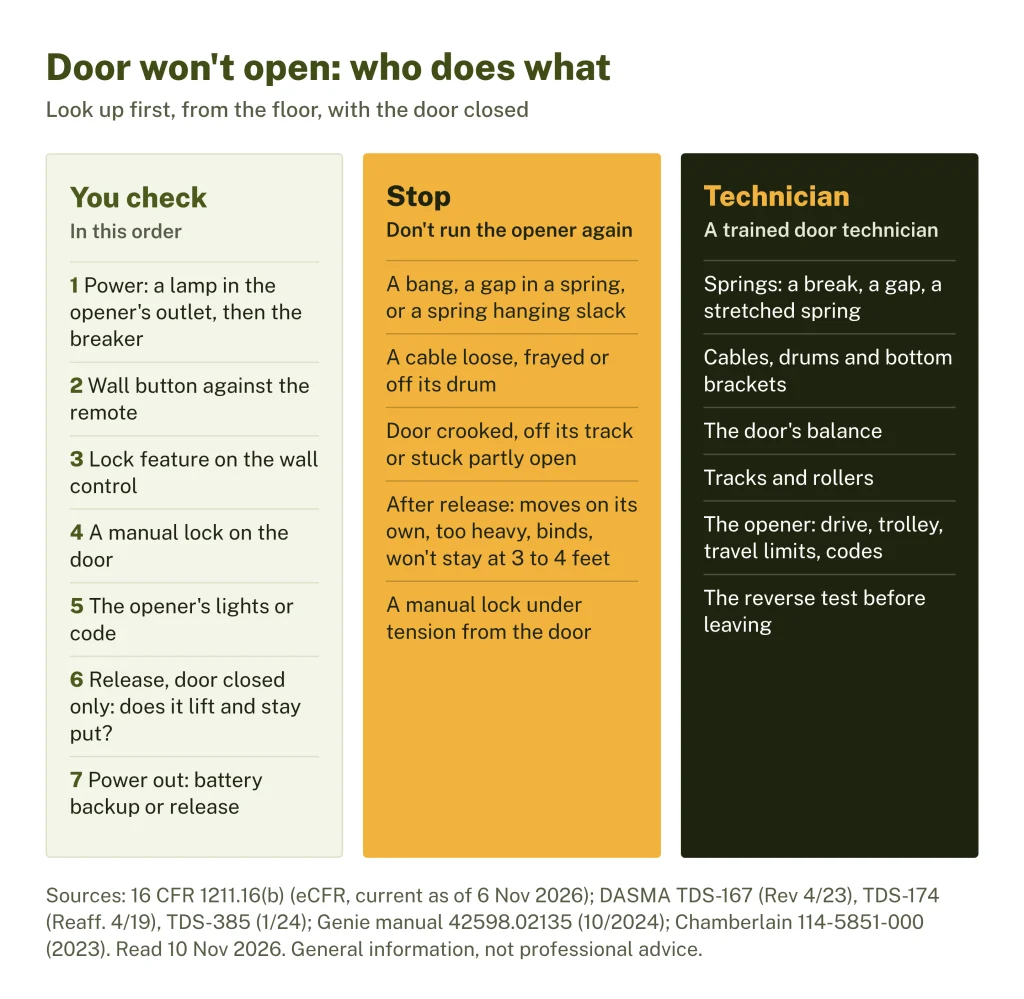
You check: seven steps in order
These are the checks the federal rule, DASMA (the door and opener makers’ trade association) and the opener makers give owners. Where we quote Genie or Chamberlain, that is what that maker says about its own openers; your manual decides for your model.
1. Power to the opener
If the opener’s light doesn’t come on and nothing clicks, start at the outlet. Genie’s troubleshooting table says to plug a lamp into the outlet the opener uses: if the lamp works, the power source is fine; if it doesn’t, check the fuse or circuit breaker (Genie, Belt/Chain Drive Garage Door Openers manual 42598.02135, 10/2024, p. 23).
Two things not to do. Chamberlain’s guide says never to use an extension cord or a two-wire adapter, or to change the plug to make it fit. If the plug doesn’t fit your outlet, its guide says to have a qualified electrician install the proper outlet (Chamberlain, Wi-Fi Garage Door Opener User’s Guide 114-5851-000, © 2023, p. 3). DASMA’s checklist also says an extension cord is not permitted (TDS-167, item 13).
2. The wall button against the remote
Press the wired wall button inside the garage. If the door opens from there but not from the remote, the opener and door are working and the problem is the signal. DASMA’s remote troubleshooting sheet puts batteries first, then light bulb interference (some LED and compact fluorescent bulbs near the opener’s receiver), nearby security or radio systems, and, near military bases, the military’s Land Mobile Radio system (DASMA TDS-374, reaffirmed 3/21). To test the bulbs, it says to remove them or turn them off and see if the remote works better.
- Battery: the remotes covered by Genie’s 2024 manual and Chamberlain’s 2023 guide take a 3V CR2032 coin cell (Genie manual p. 22; Chamberlain 114-5851-000 p. 14). Keep coin batteries away from children; Chamberlain’s guide says to call a doctor at once if one is swallowed.
- Programming: Genie lists reprogramming the remote to the opener (p. 10). Chamberlain’s steps are on p. 7 of its guide.
- Bulbs: Genie says LED bulbs may interfere with the remote signal (p. 23). Chamberlain’s 2023 guide says not to use LED bulbs in those openers at all (p. 8). Follow your own manual’s bulb list.
While the remote is out, DASMA says to use a hard-wired control such as the wall button (TDS-374).
3. The lock feature on the wall control
Many wall controls have a lock setting, and it works differently by brand:
- Chamberlain and LiftMaster (both made by The Chamberlain Group): with the LOCK button on, “the garage door opener will work from the door control but the remote controls are locked out.” Press LOCK to turn it off; the light flashes twice (Chamberlain Group support, “Light Blinks but The Door Won’t Close”, read 10 Nov 2026). The 2023 guide gives the same check for a remote that won’t work (p. 14).
- Genie: Genie calls its wall console’s lock Sure-Lock (the switch is shown in the manual’s wiring drawing, p. 5). Genie’s LED table says a flashing blue long LED, with the round LED off, means “Door will not open”: turn Sure-Lock off. Its troubleshooting table lists Sure-Lock first when the opener doesn’t respond to the wall control (Genie manual pp. 5, 23-24).
If the wall control does nothing and the lock is off, look at its thin wires where you can see them. Genie lists reversed, broken or cut wires, and says staples can cut the insulation and short the wires (p. 23). Chamberlain says the wires may be shorted or the control faulty (p. 14). Unplug the opener before anyone works on wiring: Chamberlain’s guide says to disconnect all electric and battery power before any service or maintenance (pp. 3-4).
4. A manual lock on the door
Some doors have a slide bolt or a turning handle that locks the door into the track. If it’s engaged, the opener pushes against a locked door. The federal rule’s installation instructions say to “remove, or make inoperative, all locks connected to the garage door before installing opener” (16 CFR 1211.16(b)(1)(i), item 3). Chamberlain and Genie print the same instruction in their manuals, and DASMA’s checklist asks whether the manual lock is disabled (TDS-167, item 10).
Look at both sides of the door from inside. If a lock is engaged and moves freely, unplug the opener, unlock it, and plan to have it removed or disabled. If the lock seems to be under tension from the door, DASMA says to leave it locked and stop (TDS-174, operational step 2). Call a technician.
5. The opener’s lights or code
Count the flashes before you unplug anything. Our opener code lookup gives each maker’s meaning. The patterns that most often go with a door that won’t open:
| Opener and signal | Maker’s meaning | Maker’s next step |
|---|---|---|
| Genie, long LED flashing blue | Door will not open (Sure-Lock on) | Turn Sure-Lock off |
| Genie, long LED flashing red | Door contact while travelling, or a door component failure | Remove the obstruction; Genie says to check spring, track, rollers, hinges and fixtures. Look only |
| Genie, long LED steady red | Thermal cutout | Don’t unplug; wait until it clears |
| Genie, both LEDs flashing red | Program error or component failure | Unplug, wait 5 seconds, plug in; otherwise a trained technician |
| Chamberlain or LiftMaster with arrows, code 4-2 or 4-4 | Door stops before it’s fully open | Close the door with the wall control, clear anything in the way and test again; if it still stops, the door balance test with the door closed; if it’s out of balance or still stops, a professional |
| Same, code 1-5 | Opener hums or clicks, door barely moves or doesn’t move | The maker’s linked article for what you see; on a wall-mount (jackshaft) opener with the release pulled, reconnect; otherwise a professional |
| Same, codes 2-1 to 2-5 | Opener doesn’t respond (logic board) | Unplug 5 seconds (disconnect any battery backup first); if it continues, a professional |
| Chamberlain 2023 Wi-Fi openers: hums 1-2 seconds, 5 flashes and 5 beeps | Door binding or obstructed | Open and close the door by hand (step 6); if it binds, a trained technician |
Sources: Genie manual 42598.02135, p. 24; Chamberlain Group support, “Diagnostic Codes and UP/DOWN Flashing Lights” (Security+ 2.0 and 3.0 openers with arrows, read 10 Nov 2026); Chamberlain 114-5851-000, p. 14. Your model’s manual decides for your opener.
6. Motor runs, door doesn’t move: is the opener connected?
The opener moves the door through a trolley (Genie calls it the carriage) that rides along the rail. The red emergency release handle disconnects it. If someone pulled the release, the motor and chain or belt run but the door stays where it is. Genie’s first check for “Opener runs, but door does not move” is whether the carriage is engaged. Its second is whether the chain or belt is broken or off its pulley (p. 23).
Release and check, with the door closed only. Follow your opener’s manual and DASMA’s sheets:
- Make sure the door is fully closed, none of the signs in the stop box above is there, and the doorway is clear. Chamberlain says never to use the release unless the doorway is clear of people and obstructions, and never to use the handle to pull the door (114-5851-000, pp. 4, 8).
- Pull the release handle down. Genie: pull it down and let go, following the drawing for your rail type (p. 21). On Chamberlain’s openers, pulling it down and back sets a lockout that keeps the trolley disconnected (p. 8).
- DASMA says that if the door starts to move on its own after release, stop (TDS-174, step 1). DASMA’s checklist adds that a door may unexpectedly start to open when the opener is disconnected (TDS-167, item 11).
- Lift slowly by the handles or gripping points, never by the joints between sections: DASMA warns that gripping a section joint could cause serious injury (DASMA TDS-165, 3/25). If the door is too heavy or hard to move, stop (TDS-174, step 3).
- If it lifts freely, raise it about 3 to 4 feet and let go. Genie says it “should remain stationary or slowly drift closed”; if it opens or closes rapidly, contact a trained door system technician (p. 21). This is the balance test.
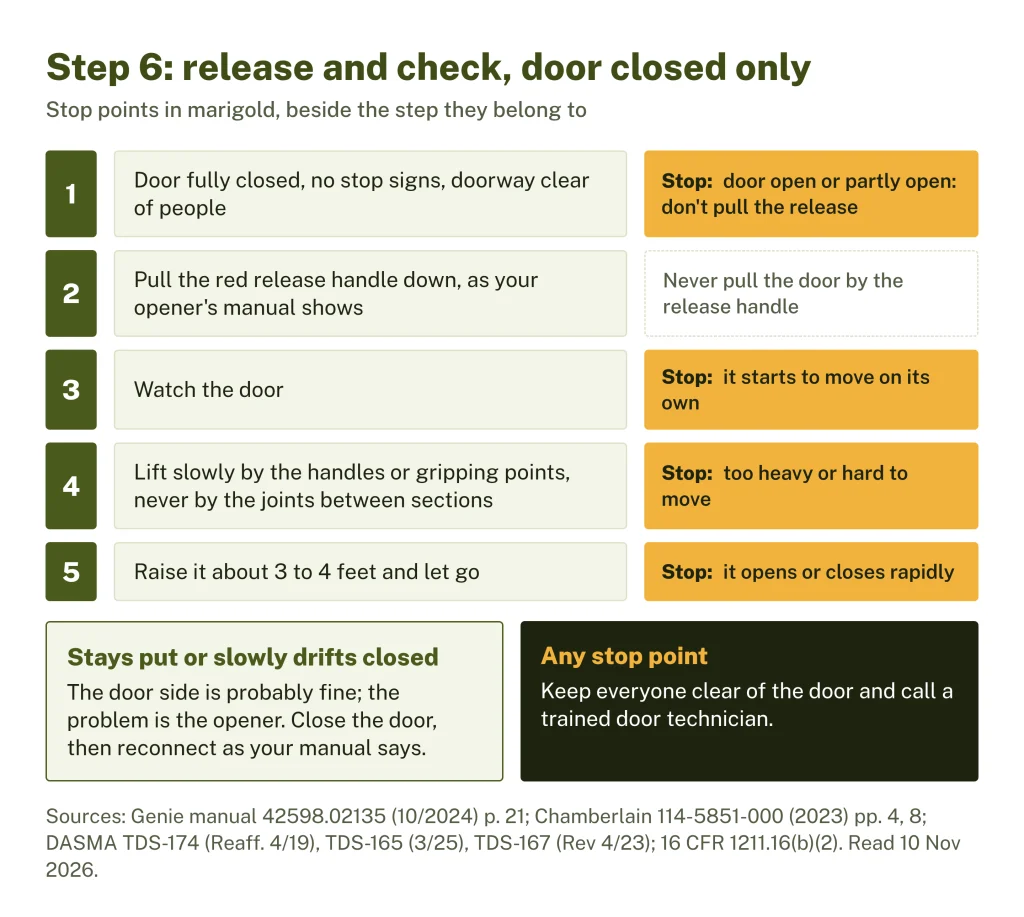
If the door moves easily and stays put, the door side is probably fine and the problem is the opener. Close the door, then reconnect: on Chamberlain’s openers, pull the handle straight down to undo the lockout and the trolley reconnects the next time the opener runs (p. 8). On Genie’s, put the carriage in the engage position and run the opener; the carriage reattaches itself (p. 21). If the opener still runs without moving the door, the chain or belt may be broken or off its pulley. We haven’t read a maker’s owner steps for refitting one, so that is for your opener manual or a technician.
If the door lifts a few inches and then stops or reverses, Chamberlain’s guide (for a door that moves 6 to 8 inches, then stops or reverses) says to open and close it by hand: it may be binding or obstructed, and if it binds, call a trained door systems technician (p. 14). Genie’s table, for a door that stops before it is fully open, lists the limits, a door, opener and springs in good repair, lubricated and balanced, and the force setting, and adds: “NEVER try to repair door hardware or springs yourself” (p. 23).
Don’t turn up the force. Force is how hard the opener pushes before it stops and reverses. Genie’s manual says to “NEVER adjust the force settings to adjust for damage, including an unbalanced door, binding door track or broken spring” (pp. 9, 16). Chamberlain’s guide gives the reason: an improperly balanced door may not reverse when required (114-5851-000, p. 4).
7. The power is out
An opener with a battery backup should still run. Chamberlain’s 2023 guide says its battery gives up to 24 hours of operation, at a slower speed, with an orange status light while on battery and red when the battery won’t hold a charge (p. 9). Genie’s LEDs flash green while the battery is in use, and flash red to yellow for a dead battery: allow 48 hours to charge, then replace it if charging fails (p. 24). DASMA says backup batteries need replacing after 2 to 5 years, depending on use and type (DASMA TDS-385, 1/24).
Without a backup, DASMA’s power-outage sheet says to disengage the opener with the red handle and open the door by hand, lifting by a suitable handle or gripping point (TDS-385). Use the same closed-door steps as step 6. Keep the moving door in sight, and never walk under a door stopped partway (1211.16(b)(2), items 3 and 4). If there was a power loss, DASMA says to wait until power is back before reconnecting the opener (TDS-174, step 7).
Don’t drive through a closed door to get the car out. DASMA’s sheet is written to avoid exactly that: collapsing the door releases the stored tension in its counterbalance (spring) system, which can put the vehicle and the people in it at risk (TDS-385).
Stop: where the owner’s part ends
Stop, keep the door closed if it is closed, and call a trained door technician if:
- there was a bang, a spring has a gap or hangs slack, or a cable is loose, frayed or off its drum;
- the door is crooked, off its track, or stuck partly open;
- after release, the door moves on its own, is too heavy to lift, binds, or won’t stay at 3 to 4 feet;
- a manual lock seems to be under tension from the door;
- the opener’s code or light points to a door component, a motor fault or a board failure that a power cycle doesn’t clear;
- the chain or belt is broken or off its pulley and your manual gives no owner step.
Leave the springs, cables, drums, bottom brackets and bottom rollers alone: no loosening, no winding, no adjusting. DASMA’s checklist says “Do not try to remove, repair or adjust springs or any door parts or mounting surfaces” and that all repairs and adjustments are for a trained door systems technician (TDS-167).
Technician: what they’ll look at
The door comes before the opener: the federal rule’s installation instructions say to “Install only a properly balanced garage door” (16 CFR 1211.16(b)(1)(i), item 2), and DASMA says an opener should be installed only on a properly balanced and lubricated door (TDS-385). What a technician can look at:
- The springs: torsion springs on the shaft above the door, or extension springs beside the tracks, for a break, a gap or a stretched spring. If one of two has broken, Clopay says both should be replaced together.
- The cables and drums: whether each cable is whole and sits in its drum grooves, and whether the bottom brackets that hold the cable ends are sound.
- The balance: whether the door stays put when partly open with the opener disconnected (CPSC Publication 523 describes the same check).
- The tracks and rollers: alignment, loose fasteners, rollers in their track (TDS-174).
- The opener: the drive (chain, belt or screw), the trolley, the travel limits, and any code the opener shows.
The federal rule’s monthly test, which also applies after any change to force or travel: “The garage door MUST reverse on contact with a 1 1/2 inch object (or a 2 by 4 board laid flat) on the floor. After adjusting either the force or the limit of travel, retest the door opener” (16 CFR 1211.16(b)(2), item 5). Ask to see the test before they leave.
Your next step
What can’t wait: a broken spring or loose cable with the door open or partly open. Keep everyone out from under it, don’t pull the release and call a technician now.
Write down before you call:
- the opener’s brand, model and date of manufacture from its label (openers made since 1 January 1991 must show the month or week and year, 16 CFR 1211.19);
- the light pattern or code, counted, and which step above you stopped at;
- what happened and when: a bang, a cold night, a power cut, someone pulling the release;
- torsion or extension springs, how many, and what you saw from the floor;
- whether the door moved by hand after release, and how heavy it felt.
Questions to ask: was it a spring, a cable or the opener? If one spring broke, will both be replaced, and at what cycle rating? Were the cables, drums and bottom brackets checked? Will they run the reverse test before leaving?
Once the door works again, do the monthly reverse test from our garage door safety guide. CPSC asks owners to inspect the door and opener every 30 days (CPSC Publication 523). If the door now opens but won’t close, Chamberlain’s first check is the safety sensors (114-5851-000, p. 14).
Sources checked on 10 November 2026. A federal update to the opener rule (91 FR 68456, 30 Oct 2026) is scheduled to take effect 29 December 2026 unless CPSC receives significant adverse comments by 30 November 2026 (checked 10 Nov 2026); it does not change the warnings quoted here.
Sources
- 16 CFR 1211.16, Instruction manual (eCFR, current as of 6 Nov 2026)
- 16 CFR 1211.19, Statutory labeling requirement (eCFR)
- Federal Register 2026-22213, 91 FR 68456 (30 Oct 2026), direct final rule on residential garage door operators
- CPSC Publication 523, Non-Reversing Automatic Garage Door Openers Are a Hazard (009608 Rv0411)
- DASMA TDS-165, Manual Operation of a Garage Door (3/25)
- DASMA TDS-167, Residential Sectional Garage Door and Electric Operator Checklist (Rev 4/23)
- DASMA TDS-174, Building Occupant: Checking a Residential Sectional Garage Door for Damage (Reaff. 4/19)
- DASMA TDS-374, Door and Gate Operator Remote Control Troubleshooting Guide (reaffirmed 3/21)
- DASMA TDS-385, Opening a Motorized Garage Door to Exit a Home in a Power Outage (1/24)
- Genie, Belt/Chain Drive Garage Door Openers Programming, Operation and Maintenance Manual 42598.02135 (10/2024)
- Chamberlain, Wi-Fi Garage Door Opener User's Guide 114-5851-000 (2023), via Chamberlain Group support manuals
- Chamberlain Group support: Garage Door Opener Light Blinks but The Door Won't Close (read 10 Nov 2026)
- Chamberlain Group support: Diagnostic Codes and UP/DOWN Flashing Lights (read 10 Nov 2026)
- Clopay: Do I Have a Broken Garage Door Spring? (5 Mar 2021)